Open Source · Windows · Free Forever

The Ultimate Remote Connection Manager

mRemoteNG is a powerful, open-source tabbed remote connections manager for Windows. Manage all your RDP, VNC, SSH and HTTP/S sessions from one unified, enterprise-grade interface.
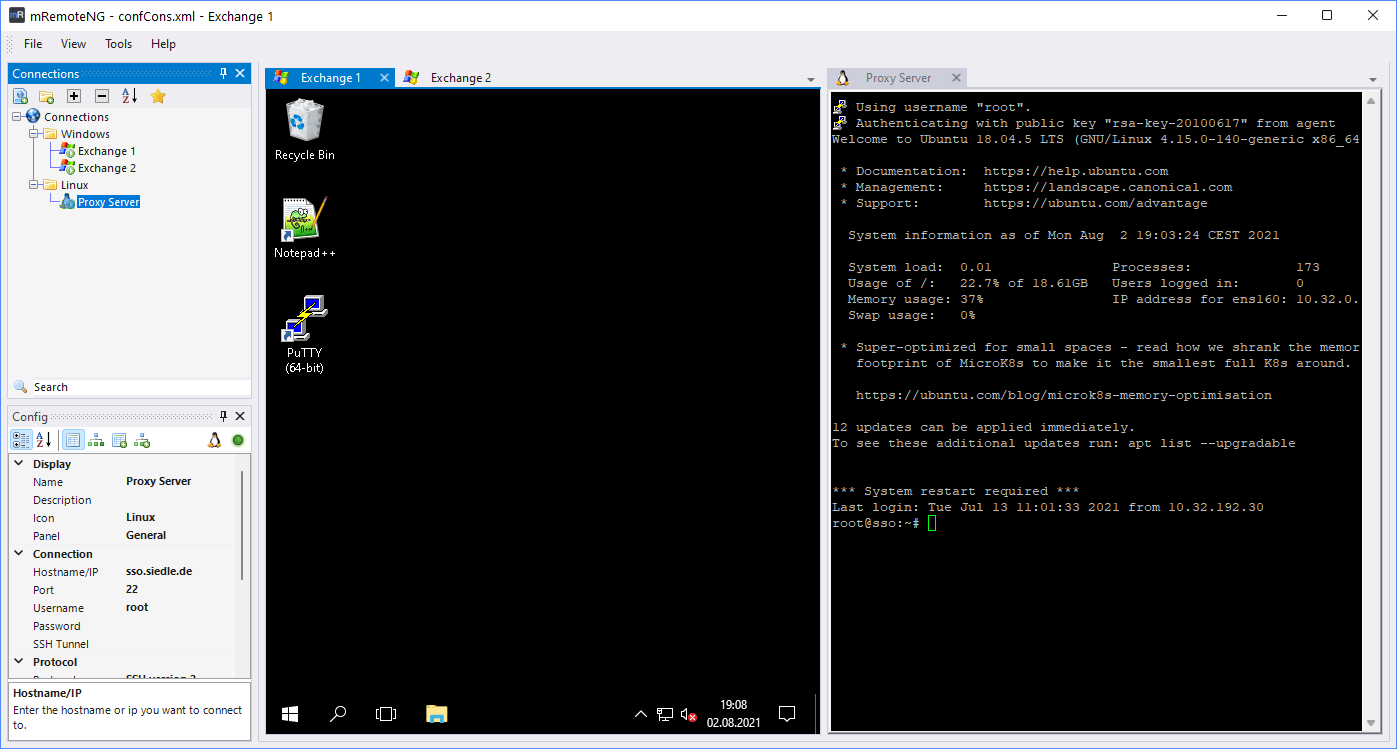
mRemoteNG managing RDP, VNC and SSH sessions in a tabbed interface

Built for Windows

Windows 7–11 / Server
GPL v2 License
Core Capabilities

Everything You Need to Manage Remote Connections

A professional-grade toolkit built for system administrators, DevOps engineers and IT professionals who demand reliability.

RDP Support

Full Microsoft Remote Desktop Protocol support with multi-monitor, clipboard sharing, drive redirection and RemoteFX capabilities for seamless Windows server management.

Microsoft RDP

VNC Protocol

Connect to any VNC-enabled machine — Linux, macOS or Windows — with support for multiple VNC flavors including RealVNC, TightVNC and UltraVNC.

VNC / RFB

SSH Terminal

Integrated SSH client with key-based authentication, port forwarding and a full-featured terminal emulator for managing Linux and Unix servers.

SSH v2

Tabbed Interface

Manage dozens of simultaneous connections in a clean tabbed layout. Switch between sessions instantly with keyboard shortcuts and organize panels freely.

Productivity

Secure & Encrypted

AES-256 encrypted credential storage, integration with Windows Credential Manager and optional master-password protection keep your connection data safe.

AES-256

Open Source & Free

Fully open-source under GPL v2. Actively maintained on GitHub with a vibrant community, transparent development and no licensing fees — ever. Fork it, extend it, own it.

GPL v2
RDP
Remote Desktop
VNC
Virtual Network
SSH
Secure Shell
HTTP/S
Web Console
Telnet
Legacy Terminal
Rlogin
Remote Login
Raw TCP
Socket Direct
Quick Start

Up and Running in Minutes

Getting started with mRemoteNG requires no complex configuration — just install, import your hosts and connect.

1

Download & Install

Download the MSI installer or portable ZIP archive. No dependencies required — mRemoteNG runs standalone on any Windows machine.

2

Add Your Connections

Import from CSV, Active Directory or add connections manually. Organize them into folders and groups with full credential management.

3

Connect & Manage

Click any connection to open a tabbed session. Switch protocols, share credentials across groups and manage all your remote machines from one window.

Download mRemoteNG Today

The free, open-source remote connection manager trusted by IT professionals worldwide. Available as a standalone installer or portable application — no account required.

Windows 7, 8, 10, 11, Server 2012–2022
~15 MB download
No registration required